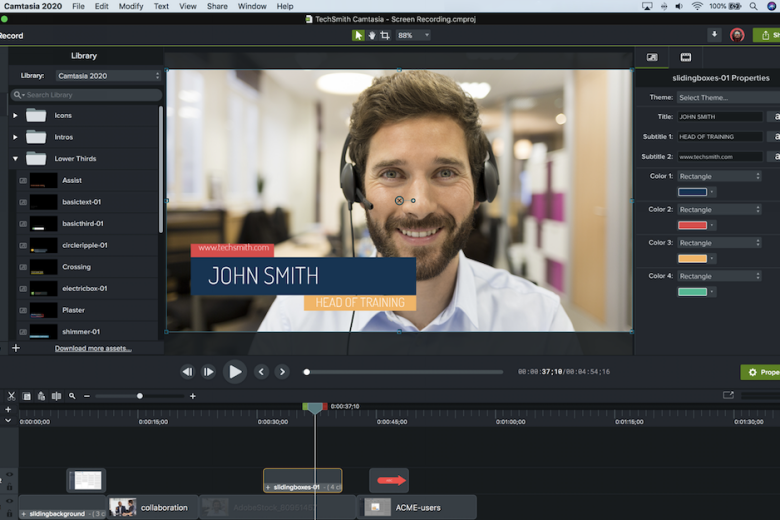
Camtasia (previously Camtasia Studio) is a powerful screencasting tool that makes it easy to record what’s happening on your PC, convert the results into a polished presentation, then share it with the world.
The program has many applications. You could use it to create a demo of your latest software, for instance. Or a technical support clip showing people how to perform some complicated PC task. Camtasia can record your performance in many games, so you can show off your skills. And it’s even able to save a local copy of a streaming video clip, complete with audio.
Capturing is straightforward. Choose the size or window you’d like to capture, click the Record button and carry out whatever actions you need. Press [F10] when you’re finished and Camtasia will convert your screen activity into a movie.
A wide range of editing options will then help to change your rough cut into something more professional. You’re able to insert title pages, apply captions, include photos or video clips, add a soundtrack, and more. It’s easy to highlight cursor movements and mouse clicks to help people see what you’re doing, or, if you prefer, you can have Camtasia zoom in on important areas. It’s even possible to add graphics with clickable links that will take viewers to another part of the video, or an external web page.
When you’ve finished, Camtasia can export your movie to many different formats: MP4, FLV, SWF, MPV, AVI, Silverlight-compatible WMV, MOV, RM, even animated GIF or MP3. Or, if you prefer, the program will upload your movie directly to YouTube or Screencast.com, TechSmith’s own video hosting service.
Verdict:
Camtasia Studio is a great screen recorder and video editor, but will you love it enough to pay the heavyweight price?
Operating Systems:
TechSmith
Free
501.00 MB
Specifications
Requirements
2GB free hard drive space
Changelog
What’s new in Camtasia 2026 (see full changelog for more)?
– Edit video by editing text with Camtasia Audiate:
– Text-based editing is now only a button click away. Edit as Text will send your media to Camtasia Audiate to edit with text and clean up your audio with professional-grade effects.
– Adjust Rev media directly on the canvas:
– Fine tuning of Rev media components now possible on canvas and in properties. Quickly make adjustments to screen, camera, and background without unpacking Rev media.
– Add dynamic captions directly to Rev media:
– Add dynamic captions to any Rev media on the timeline, without having to unpack it first. Simply drag the dynamic caption onto the timeline to generate captions for Rev media.
– Apply SmartFocus to Rev media for automatic zooms:
– Adding SmartFocus for automatic zooming and panning is easier than ever! SmartFocus is now a screen effect that can be turned on in Camtasia Rev.