PicPick is a screen capture tool that comes with a host of useful options and extras.
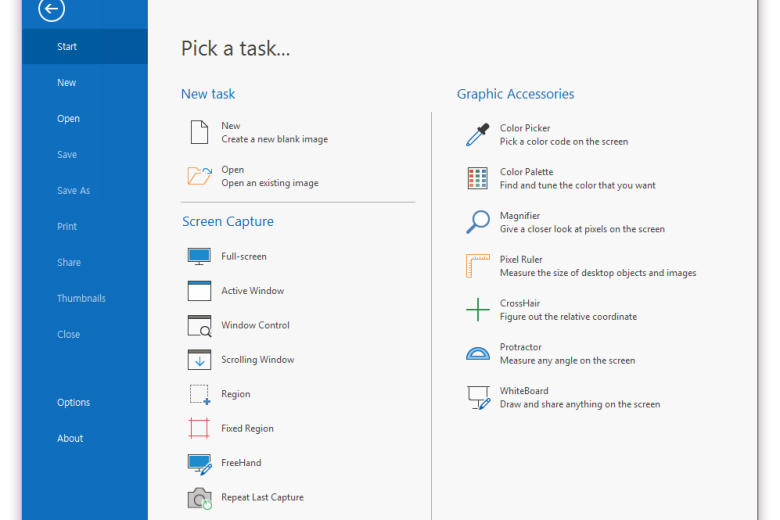
The program supports many different capture types, for instance: full-screen, active window, a window control, a scrolling window, a region on the screen, freehand captures and more. These all have their own hotkeys, which by default are variations on the usual PrtSc options (so a freehand capture is Shift+Ctrl+Alt+PrtSc), but you can alter them to whatever works for you.
Once you’ve captured something, PicPick can send the image to several destinations. It can upload your picture to Facebook, Twitter or an FTP server; send the image via email; output it to Word, PowerPoint or Excel; print the image, save it to a file, or copy it to the clipboard, amongst other options.
The default destination, though, is PicPick’s own image editor, which is just as feature-packed as the rest of the program. So once it’s opened your grab, then you can crop, resize or rotate it, customise it with the painting and drawing tools, add text captions, tweak colour and brightness, add frames and apply some useful special effects.
And just in case you need more, bonus tools include a colour picker, screen magnifier, a pixel ruler, screen protractor and crosshair, even a whiteboard for assistance during presentations.
Despite all this power, PicPick consumes very few system resources, a mere 7MB of RAM (private working set) when running in the background on our test PC. And it makes no use of your Registry, so can easily be made portable: just copy the PicPick folder to a USB drive and you can run it on any convenient system.
Verdict:
An amazingly powerful screengrab suite
(2)
Audio, Video & Photo
Specifications
Requirements
Changelog
Version 7.6.0 brings these changes (see changelog for more):
Added support for saving in WebP file format
Added horizontal scrolling in the Image Editor with Shift and mouse wheel
Fixed control capture failing to detect specific windows
Fixed focus loss during delayed active-window captures.