Not everyone needs a full-blown PDF editor. For most people, their PDF editing needs go no further than being able to generate new PDFs from existing ones without having to edit any content. You might, for example, want to extract several pages from a large PDF document, or combine elements of two or more PDF files together.
Some of these features can be found in PDF viewers, but in recent years they’ve tended to strip out any editing features in the hope of pushing you towards a solution that’s far too powerful (and expensive) for your needs.
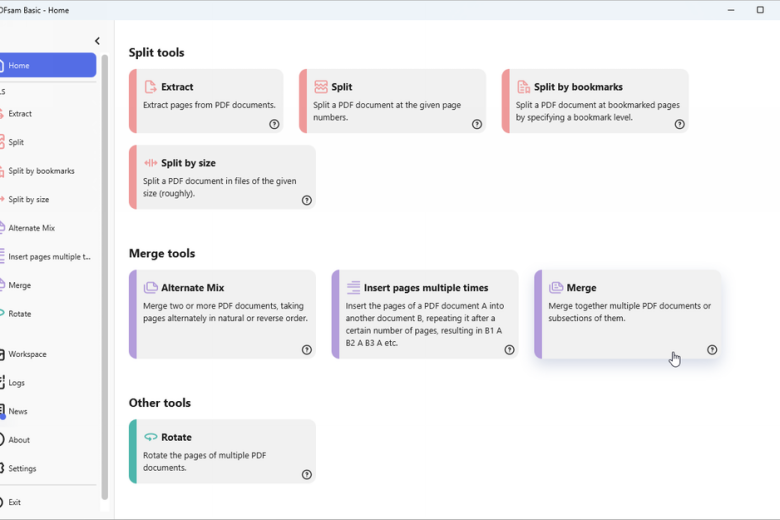
PDFsam Basic is designed to sit alongside your PDF viewer to offer extra features you may be missing. Fire it up to be confronted with an attractive list of options, split into three broad sections: Split, Merge and Other. Each one has a quick explanation offering exactly what it does – either click one or use the menu on the left to jump to the relevant part of the program.
You’ll then be shown a list of controls related to the option you’ve picked. At the top is where you select your PDF or PDFs, then beneath this are a series of context-sensitive settings. Everything is logically laid out and easy to understand – set things up and click Run to produce a new PDF from your previous choices.
Look out too for a collapsible advanced settings section allowing you to shrink the output file through compression and choose a PDF standard version (1.5 through to 2.0) if you need to change it for compatibility reasons.
What’s great about PDFsam Basic is that it doesn’t try to reinvent the wheel or overcomplicate matters. There’s a handy Settings option where you can switch between a selection of light and dark themes and set up a default workspace and working directory. You’ll also find a setting here to hide premium-only features, which are basically shortcuts to two paid-for versions: PDFsam Visual (makes it easier to work with multiple PDFs through drag-and-drop thumbnails along with some additional features like a text extraction tool), and PDFsam Enhanced (a fully fledged editing tool with viewing, OCR and conversion capabilities).
Verdict:
A decent tool offering basic splicing and merging tools for quickly carving up and combining PDF files.
Operating Systems:
Sober Lemur SRL
Free
68.00 MB
Specifications
Requirements
64-bit OS, 256MB RAM, 70MB hard drive space
Changelog
Version 6.0.0 contains the following changes:
+ Upgraded JDK to version 19.1.2
+ Updated translations
+ Upgraded dependencies
+ New layout for the side bar where all the controls have been moved
+ Added a setting to drive the font size used in the application
+ Page normalization in Merge tool is now a combo with an additional entry
+ Added the total number of selected pages in Merge and Alternate Mix tools
+ Added a column to Merge and Alternate Mix tools to show the number of selected pages per row, based on the input interval
Other changes from a pre-release:
+ Refreshed the default light theme
+ Added a couple of dark themes and an additional light theme
+ Extract pages tool now has the ability to create a separate PDF file for each page range
+ Added a new tool to insert a PDF document (every page or selected pages) into another one, multiple times every “n” pages.
Deal of the Day
-20%
Nitro Pro 11
Powerful PDF creation, editing and management tool